Guest Experience, Email Campaign Builder
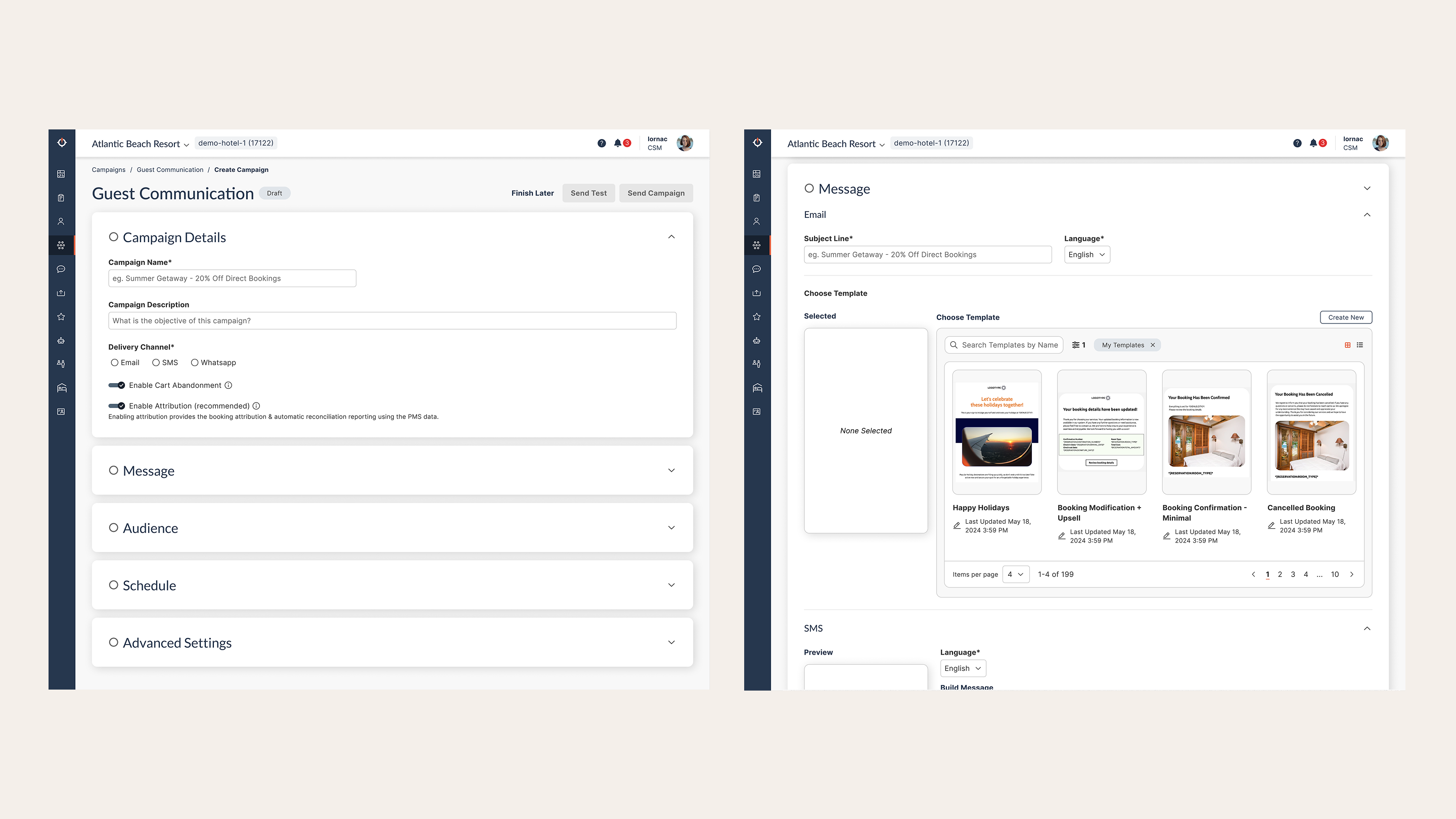
Overview
GES (Guest Experience Service) is a hospitality platform used by hotel properties and their power users to create and send targeted email and SMS campaigns to guests. I led the redesign of the campaign creation flow, covering template design, audience segmentation, and scheduling, with the goal of improvement the user experience and reducing the time it takes both property teams and internal creative teams to build and launch a campaign for a single property.
"The redesign cut end-to-end campaign creation time by 50%, from 30 minutes down to 15 minutes."
Problem
The existing campaign builder was a fragmented, multi-step flow that forced users to navigate across disconnected areas of the product. There was no clear linear path through the process, CTAs were ambiguous, and users had to repeatedly switch between accounts and screens to complete a single campaign.
The three core tasks, designing an email, segmenting an audience, and scheduling a send, felt like three separate products loosely stitched together, with no shared context or continuity between them.
This was particularly painful for the internal creative team, who were power users running campaigns across multiple hotel properties daily. They had developed workarounds just to function efficiently, which signalled deep friction in the baseline experience.
Research
I partnered closely with the internal creative email team - the heaviest day-to-day users of the platform, conducting interviews and working sessions to map their actual workflow against what the product assumed they were doing.
User journey mapping
I documented the end-to-end journey, capturing every action, pain point, and workaround. Key findings from the creative team journey included:

End-to-end user journey map for the Creative Team documenting actions, pain points, and workarounds.
-
Template access required account switching Templates lived in a demo hotel account, forcing users to copy templates across accounts manually with no confirmation the action had succeeded.
"I have to go into the demo hotel to access my templates , it's time consuming."
-
Segmentation had to be rebuilt from scratch every time There was no way to save or reuse a segment, meaning users repeated the same configuration for every campaign.
"I cannot re-use segments, I need to create a new one every time."
-
The scheduling flow had no clear entry point Users navigated through a confusing flowchart (CRM → Guest Journey → Booking & Pre-Stay → Guest Communication) to reach what was essentially a send scheduler.
"If we could just have a dedicated scheduling section, that would make so much sense."
-
Saving ejected users from the campaign After saving, there was no return path, users had to search for the campaign they had just created to continue editing.
"After saving it takes you out of the scheduling and I have to find it and go back in again."
-
Settings had to be re-applied in multiple places Settings like OTA exclusion had to be configured repeatedly with no way to save defaults.
"You have to keep excluding the OTAs from different places."
Competitive research
I reviewed comparable campaign builders to understand how leading tools structure multi-step creation flows, template libraries, and audience management, informing the structural decisions in the redesign.
Usability testing
Designs were tested with the creative team across multiple rounds, using their real workflows as the test scenarios. Feedback directly shaped the sequencing of steps, the placement of CTAs, and the information shown at each stage.
Solution
The redesign consolidated the campaign creation experience into a single, sequential flow with five clearly named sections: Campaign Details → Message → Audience → Schedule → Advanced Settings. Each section is collapsible and visually confirms completion with a status indicator, giving users a clear sense of progress and allowing non-linear editing without losing context.
Key changes
-
Unified campaign builder All five steps live on one page, removing the need to navigate away mid-task.
-
Inline template selection Templates are browsable and selectable within the Message step, with a preview panel, removing the need to switch accounts.
-
Persistent campaign state Saving no longer ejects users from the flow; completed sections summarise their values inline.
-
Audience picker embedded in flow Segment selection appears as a step within the campaign, not as a separate navigation destination.
-
Clearer CTAs throughout "Send Campaign", "Send Test", and "Finish Later" are always visible in the header; each section has unambiguous primary actions.

The unified campaign builder, consolidating all five steps into a single sequential page with status indicators.
Design
The redesigned flow introduces a stepped accordion layout that mirrors familiar SaaS patterns, each section expands when active, collapses with a summary when complete, and uses a green status indicator to signal readiness. The Message step supports both Email and SMS configuration in a single view, with the template chooser surfaced inline rather than behind a separate navigation path.
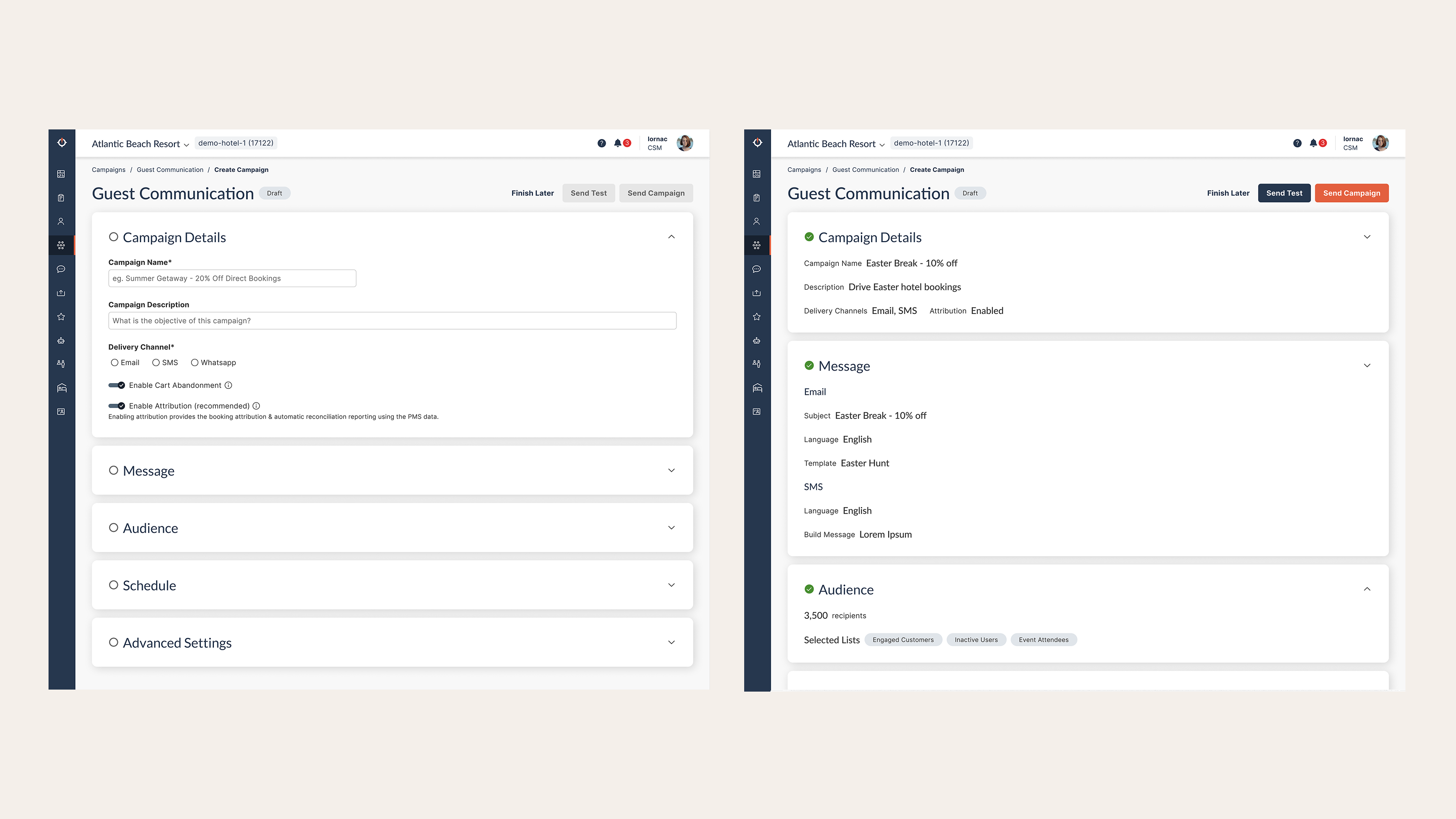
The accordion-style campaign builder. Each section collapses with an inline summary once completed, giving users a persistent view of progress.
The Audience step exposes segment lists and guest counts in a scannable table with direct "Select" actions, replacing a hidden dropdown flow with a transparent, searchable picker.
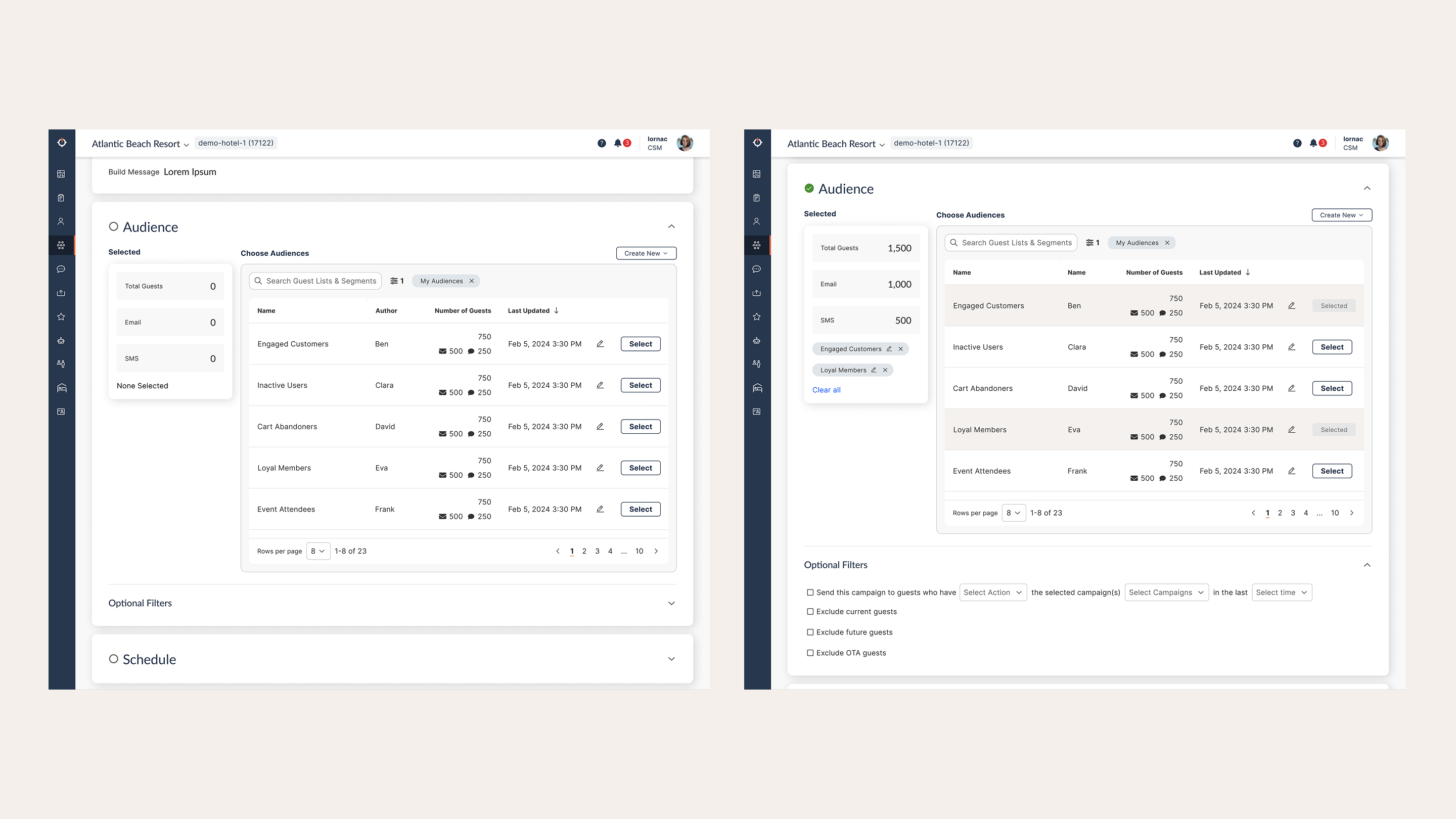
The Audience step, showing segment lists with guest counts, replacing a hidden dropdown with a scannable, searchable table.
Advanced Settings, previously buried and inconsistently applied, are consolidated at the end of the flow, with attribution and UTM configuration grouped logically and only shown when relevant toggles are enabled.
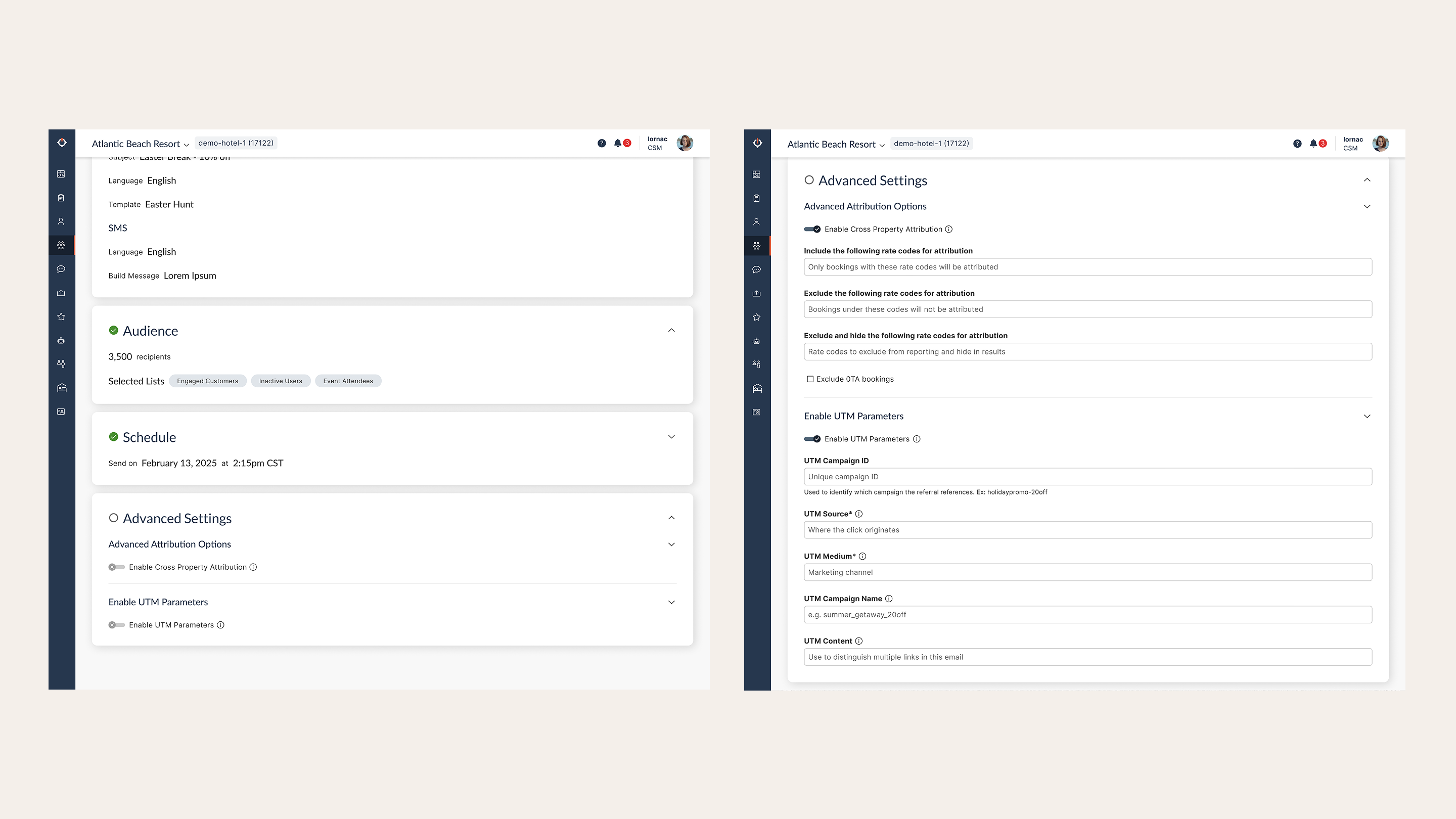
Advanced Settings consolidated at the end of the flow, with attribution and UTM fields surfaced only when their respective toggles are enabled.
Outcomes
Time savings were validated with the creative team using their own live workflows as benchmarks. The redesign eliminated account switching, removed redundant re-entry of repeat settings, and gave users a confident sense of where they were and what came next, reducing both cognitive load and backtracking.
| Metric | Before | After | Change |
|---|---|---|---|
| Total campaign creation time | 30 min | 15 min | ↓ 50% |
| Design step | ~12 min | 7 min | ↓ 42% |
| Segmentation step | ~10 min | 4 min | ↓ 60% |
| Scheduling step | ~8 min | 4 min | ↓ 50% |